reactor.yaml, and the runtime
hooks the same frames your model is already emitting, encodes them in the background, and exposes a
clip API to clients.
Enabling recording
A single line inreactor.yaml turns the recorder on:
reactor.yaml
No changes to your model class. The runtime taps the same frames it delivers to the wire, so
everything your model emits ends up in the recording too.
What gets recorded
The recorder consumes one video track and (optionally) one audio track from your model’sOutput. With a single-track model the runtime picks them automatically. With multiple tracks of
the same kind, name the ones you want:
reactor.yaml
self.output.flush() cuts live playout to black, and the recording keeps running across it, so a
clip spanning a reset contains both sides of it.
Configuration reference
Every field has a sensible default. Override only what you need.reactor.yaml
REACTOR_RECORDINGS_DIR in the environment does the same job as recording_dir, for a deployment
that picks the directory at run time rather than at authoring time.
A few of these are worth a closer look:
chunk_secondscontrols how “live” clips feel. The runtime can only serve a clip whose tail chunk has finished writing, so smaller values reduce the cold-start delay betweenrequestClip(N)and the manifest becoming playable. The default of 4 s gives a tail lag of roughlychunk_seconds + 1 s.target_width/target_heightlock the recorded resolution regardless of the frames your model produces. Use these when your output resolution can change at runtime, for example a WebRTC-driven source whose bandwidth estimator ramps the resolution up over the first few seconds. Without a target, the recorder would lock to the first frame’s size and rescale the rest.skip_leading_blackanchors the timeline at your model’s first real frame, so a clip’s markers and its bytes share an origin rather than counting from the moment the session opened.
Capturing clips from the Demo Frontend
The fastest way to confirm recording works end-to-end is the Demo Frontend. Whenrecording.enabled: true is set on your
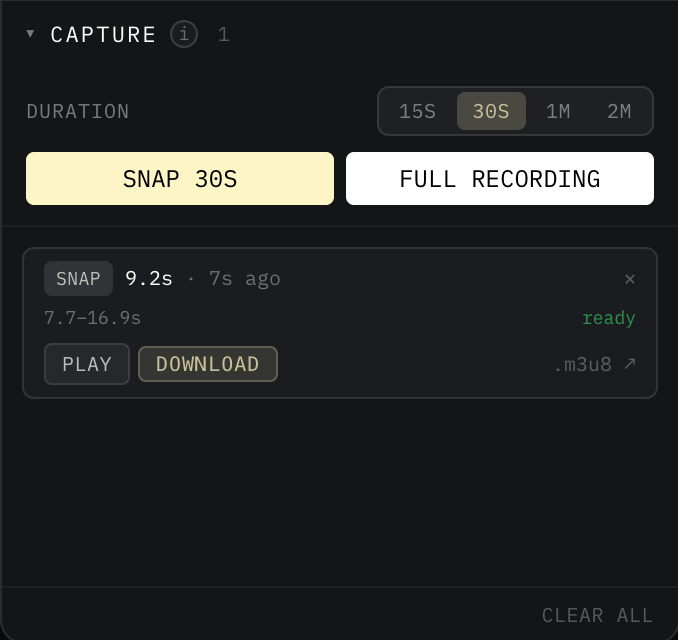
model, the sandbox’s Capture panel becomes interactive:
1
Run your model locally with recording on
Set The runtime writes chunks to a fresh temp directory inside the container at session start. Chunks survive reconnects within the same
recording.enabled: true in reactor.yaml and start the runtime:reactor run invocation but are reset whenever the container restarts.2
Open the Demo Frontend
Visit reactor-sandbox.vercel.app, pick Local model, and
click Connect.
3
Snap a clip
On the right side panel, the Capture section exposes two actions:
- Snap N seconds: grabs the last
Nseconds of the live session. Duration presets are 15 s, 30 s, 60 s, and 120 s. - Full recording: grabs everything from the start of the session up to now.

Integrating capture into your own client
When you’re ready to ship recording in a real application, the Reactor JavaScript SDK exposes the same two primitives as one-line calls on theReactor instance:
<ClipPlayer />,
<ClipDownloadButton />). The full guide, including how to authenticate downloads in production,
is in Recordings.
Once
recording.enabled: true is set, the Reactor JS SDK exposes the full recording experience to
any client application: capturing clips, playing them back, downloading them as MP4, and rendering
the matching UI components. Application developers can build on top of these primitives without
touching your model.How long a clip stays fetchable
A recording is kept for five minutes after its session ends, which is long enough for a client to pull a last snap, and then its directory is deleted. The live recording is never touched, however long the session runs. Fetch one that has aged out and the clip endpoints answer410 Gone, so a
client that holds a URL across a long gap needs to handle that rather than assume the bytes persist.
The recording lifecycle
The samerecording.enabled: true setting works at every stage of your model’s life.
1
Local development
Add the
recording: block to reactor.yaml and run reactor run. The runtime writes chunks to a temp directory inside the container and serves them back from a local /clips endpoint on the same port as your model.2
Shipping
Commit the
recording: block. There are no build-time changes to make. The recorder ships with
the runtime and is wired up automatically when enabled: true.3
Production
Reactor’s compute plane allocates per-session storage and presigns chunk uploads. Clients hit the Coordinator’s
/clips endpoint with the same Clip.playlist_url they got back in dev. The SDK transparently rewrites it onto the production origin.Performance impact
Recording runs alongside your inference loop on a separate thread, so it never blocks or slows the frames going to the client. Encoding happens in process, with no external binary to install or shell out to. The encoder owns its own backpressure budget: if it ever falls behind, the recording absorbs the loss, not the live stream.Next
Audio
Audio tracks, and how they stay in sync with video in a clip.
Weights
Another
reactor.yaml knob that follows the same local-to-production lifecycle.